After making sure your data was acquired correctly (see also this post) and all looked good - you can go ahead and start tensor fitting. At the core of tensor fitting is using the right gradient directions and sometimes (for programs like Camino) creating a so called "scheme file". A scheme file consists of both the b-values and b-vectors. The b-values are the amount of diffusion weighting used for each volume. Depending on how many non-diffusion weighted or B0 scans you collect (read more on its use here) and what diffusion weighting max you use your b-value file is going to look something like this (shortened version):
0,0,0,0,0,0,1000,1000,1000,1000,1000,1000,1000,1000,1000,1000,1000
Your b-vector are the gradient directions that you collect, often predetermined by the scanner depending on how many total directions you choose to collect. A b-vector file will look something like this (shortened version):
 |
| b-vectors |
The b-vectors consist out of 3 separate vectors (x, y, z) for each direction acquired. A program like fsl2scheme (more info here) will be able to combine the b-values and b-vectors into a scheme file. Together looking something like this (note that there are 4 b0 slices visible, while the scheme file only shows 1 b0):
 |
| Scheme file, next to diffusion volumes |
If you run a eddy correction it is advisable to correct your scheme file for the induced movement of each volume after registration. Here are a couple of resources to help you with this:
http://blog.cogneurostats.com/?p=302
http://onlinelibrary.wiley.com/doi/10.1002/mrm.21890/abstract
https://github.com/bernardng/codeSync/blob/master/dMRIanalysis/rotatebvecs
https://www.jiscmail.ac.uk/cgi-bin/webadmin?A2=FSL;3c23f260.0903
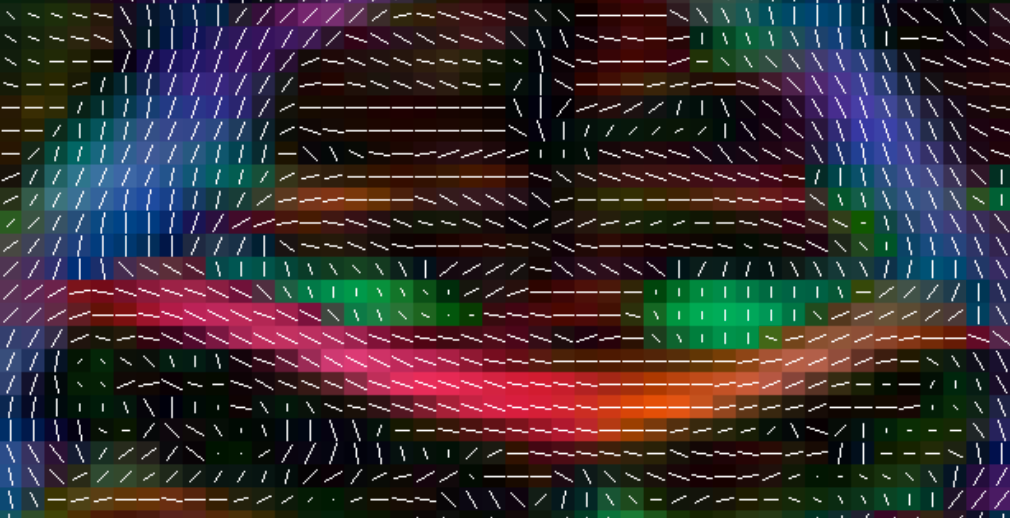
After running the tensor fitting command you will have to check if the vectors were applied correctly. In the below examples we are using Camino's pdview, but you can use any program that allows you to view the tensors. You should check the axial, coronal and sagittal views. As a reference the corpus callosum can be used, the tensors should follow the shape of the corpus callosum (in red) in a fluid motion, as in the examples below:
 |
| Axial view |
 |
| Coronal view |
 |
| Sagittal view |
EXAMPLES OF WRONG ORIENTATION:
Notice the tensor orientations in corpus callosum (red area)
 |
| Wrong orientation |
Fix it by adjusting the scheme file:
There are multiple options to correct the scheme file in the fsl2scheme command:
- add -usegradmod(usually when error pops up)
- add -flipx
- add -flipy
- add -flipz
- or any combination of the above, eg. as used in the example above: fsl2scheme -bvecfile bvecs.txt -bvalfile bvals.txt -flipx -flipy -usegradmod prefix.scheme
EXAMPLE OF WRONG COLOR:
Notice the blue corpus callosum
 |
| Wrong orientation |
Fix it by adjusting the b-vector table:
- In the bvecs text file, swap the x and z row with the directions.
- And in this specific case: fsl2scheme -bvecfile bvecs_zx.txt -bvalfile bvals.txt -flipx -flipz -usegradmod prefix.scheme
ANOTHER EXAMPLE:
Notice the green corpus callosum
 |
| Wrong orientation |
Fix it by adjusting the b-vector table:
- In the bvecs text file, swap the x and y row.
- And in this specific case:
fsl2scheme -bvecfile bvecs_yx.txt -bvalfile bvals.txt -usegradmod prefix.scheme
x - Red
y - Green
z - Blue
A major issue in DTI image analysis is quality control. Effective quality control for diffusion images relies both on pre tensor fitting (the diffusion weighted images; DWI), and post tensor fitting (the diffusion tensor images; DTI) checks.
First you will have to check if all volumes were acquired correctly; using fslinfo is one method:
This way you can check if each image has the correct number of volumes and the correct pixel dimensions. Something else you should really pay attention to is the quality of each raw DWI image. If you visually scroll through all the different directions you might come across this:
This does not necessarily have to be a problem if it happens occasionally, but I can become a problem for the tensor calculation if it occurs more frequently (depending on how many directions you acquired).
Next, check the amount of distortion in your image; echo planar imaging (EPI), which is used for diffusion images - are particularly sensitive to stretching in the prefrontal and ventral temporal parts of the brain (depending on the direction of acquisition). For example:
This can be fixed by acquiring a fieldmap that measures the amount of distortion. Read more about this here and here. Or by acquiring data in two opposite directions and then calculating the average. FSL's TOPUP can help out here.
Some other more serious error images that have no fix: